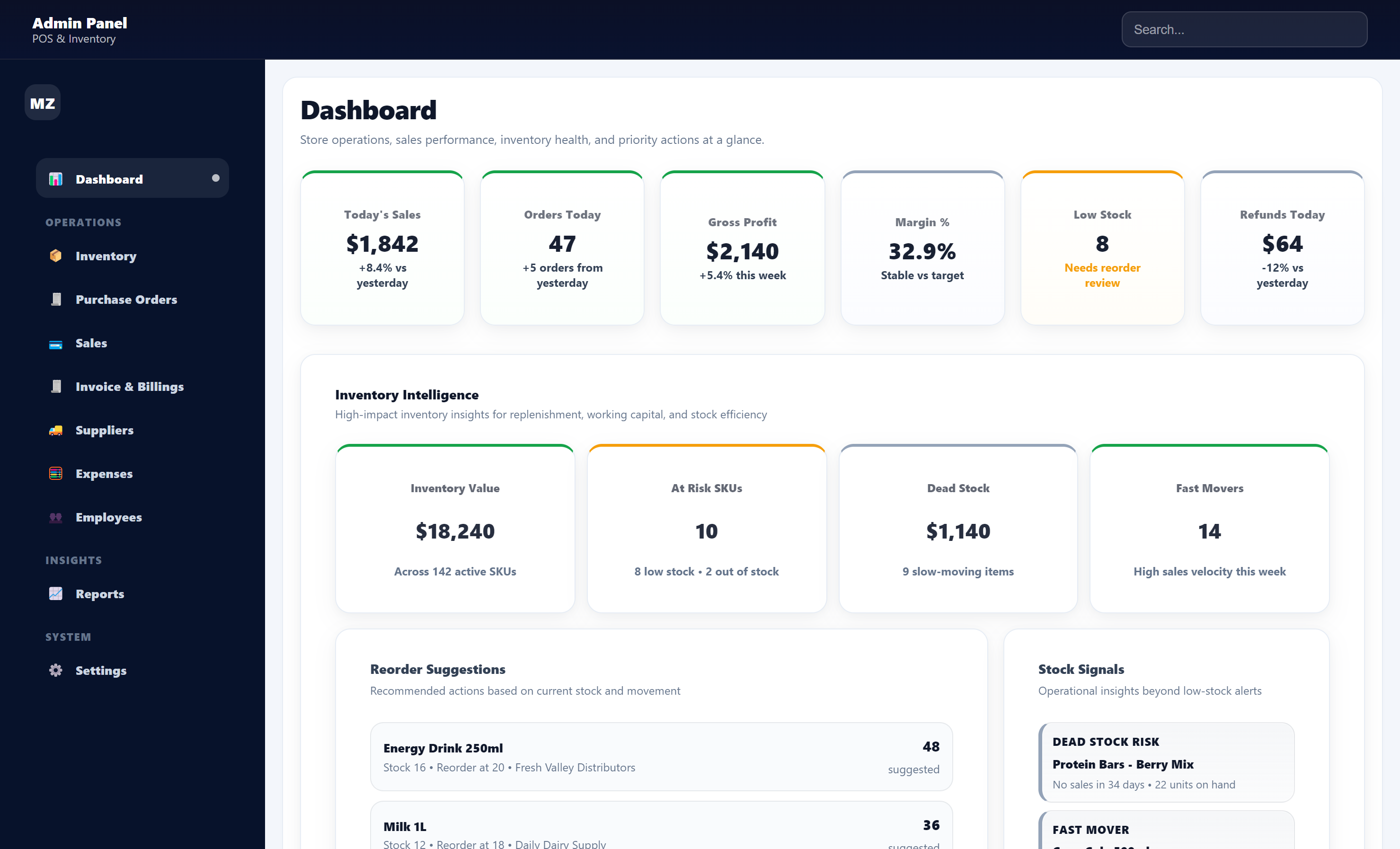
Administrative dashboard for retail operations

Retail POS Admin Dashboard

An end-to-end retail operations platform designed as the administrative intelligence layer of a convenience-store ecosystem. The platform consolidates sales, inventory, supplier workflows, expense oversight, employee management, reporting, and business settings into one structured interface.

RoleProduct Design, UX Design, Frontend Development
ToolsReact, Vite, JavaScript, CSS
UX design systems and interaction design
Design ownershipEnd-to-end UX design from research to final interface

POS Admin Dashboard

System Snapshot

A centralized dashboard designed to unify sales, inventory, suppliers, expenses, employees, and reporting into a single operational interface for retail businesses.

Cover page of the Retail POS Admin Dashboard case study
System dashboard overview interface
01 · Project overview

A centralized dashboard for fragmented retail operations

Retail store owners—especially those running convenience stores—manage a wide range of operational tasks every day. Sales tracking, inventory monitoring, supplier coordination, employee management, expense tracking, and reporting are often handled across multiple disconnected tools or spreadsheets. This fragmentation creates inefficiencies, reduces visibility into store performance, and makes decision-making slower and less reliable.

To address this problem, I designed and developed a Retail POS Admin Dashboard, a centralized system that helps convenience store owners and managers monitor and manage their daily operations from a single interface. The system design considered scalability constraints, modular growth, and usability across varying store sizes and operational complexity.

Platform focus

  • Sales Monitoring
  • Inventory Management
  • Purchase Order Management
  • Expense Management
  • Supplier Management
  • Employee Oversight
  • Financial Reporting
  • Business Settings

Why it matters

Instead of navigating multiple systems, store managers can use one structured dashboard to access operational insights and manage store activities more efficiently. The project focuses on creating a clear, actionable, and scalable administrative interface that allows retail managers to quickly understand the state of their business and respond to operational needs.

02 · Problem statement

Disconnected tools create blind spots and slow retail decisions

  • Limited operational visibility - critical store data is spread across different sources
  • Slow decision making - shortages, refunds, or supplier delays are harder to detect quickly
  • Operational inefficiency - routine tasks require multiple steps across different systems
  • Lack of actionable insights - many small retailers lack tools that transform operational data into useful decisions
03 · Project goals

Design goals

  • Centralize store management across sales, inventory, suppliers, employees, expenses, and reports
  • Improve operational visibility through KPIs and structured reports
  • Simplify daily workflows like purchase orders, expense review, and stock tracking
  • Support data-driven decisions using reporting and analytics
  • Build a scalable interface that can later connect to a POS transaction layer
04 · My role

End-to-end product design and development

  • Product concept development
  • UX research and workflow planning
  • Information architecture design
  • UI design and component structure
  • Frontend development using React
  • Responsive layout design
  • Data modeling using realistic operational scenarios
  • UX refinement and usability improvements
05 · Target users

Who the system is for

The dashboard was designed primarily for convenience store owners, store managers, and operations supervisors. These users work in fast-paced environments and need tools that provide quick insights without unnecessary complexity.

Convenience store owners

Need a high-level view of performance and profitability

Store managers

Need inventory, supplier, and day-to-day operations control

Operations & finance supervisors

Need expense, billing, and financial transparency

06 · Key features

Modules that support daily store operations

The POS Admin Dashboard includes multiple functional modules designed to support daily store operations.

Dashboard overview feature page

Dashboard overview

Monitor overall store performance, inventory health, and key business metrics from a single operational overview.

Sales management feature page

Sales management

Track transaction activity, monitor revenue performance, and review product sales.

Inventory management feature page

Inventory management

View stock levels, monitor inventory health, and identify low-stock or high-risk items.

Purchase orders and expense tracking feature page

Purchase orders and expense tracking

Create and manage supplier purchase orders and track incoming inventory.

Expense management feature page

Expense Tracking

Record and categorize business expenses for better financial visibility.

Supplier management feature page e

Supplier Management

Maintain supplier records and streamline ordering workflows.

Employee Management page

Employee Management

Track employee information and operational activity

Reporting & Analytics page

Reporting & Analytics

Generate reports to analyze sales performance, product trends, refund activity, and operational risks.

07 · Design approach

Balancing information density with usability

Retail managers need access to large amounts of operational data, but the interface must remain easy to scan and understand. The design process focused on balancing information density with clarity.

  • Important metrics and KPIs are placed at the top of each page
  • Cards, tables, filters, and reports follow consistent structures
  • Key actions such as creating purchase orders or reviewing transactions stay easy to reach
  • Reusable UI components support future platform growth
08 · Research and discovery

Looking beyond the POS terminal

The research phase explored how convenience stores typically manage day-to-day business operations. While transaction tools may be modern, inventory oversight, supplier coordination, expense tracking, and operational reporting often remain fragmented across spreadsheets and manual workflows.

The opportunity was to design an admin dashboard that acts as a centralized operational layer rather than only a transaction-processing interface.

10 · Competitive landscape

Comparative analysis of existing retail platforms

Competitive review of existing retail platforms highlighted Square POS, Shopify POS, and Lightspeed Retail. This section turns that research into a clean comparison area while leaving room to replace the visual with a custom matrix later.

Square POS

Simple and clean transaction management with basic analytics. Good at checkout and straightforward sales tracking, but deeper operational insight is limited without extra integrations.

Shopify POS

Strong inventory and sales integration, especially for e-commerce-connected retail. Many advanced capabilities are more aligned with online retail than convenience-store operational oversight.

Lightspeed Retail

Feature-rich inventory and reporting tools for retail environments, though the interface can feel heavy or complex for smaller store operators.

Key takeaways

  • Retail managers need clear operational visibility, not just transaction reports
  • Inventory management and supplier coordination are critical pain points
  • Many systems prioritize transaction processing more than operational intelligence
  • Simplicity matters in fast-paced retail environments

Competitive Feature Comparison

A quick comparison of existing retail platforms against the proposed POS Admin Dashboard solution.

Feature Square POS Shopify POS Lightspeed Retail POS Admin Dashboard
Transaction Processing Strong Strong Strong Strong
Inventory Management Basic Advanced (E-commerce focused) Advanced Integrated store-focused
Supplier Management Limited Limited Available Built-in workflow
Expense Tracking Minimal Limited Basic Integrated financial oversight
Operational Alerts Limited Limited Moderate Real-time alerts
Business Intelligence Basic reporting Sales analytics Detailed reports Unified operational dashboard
Ease of Use for Small Retail High Moderate Moderate High
Market Insight

Most existing retail POS platforms prioritize checkout and transaction processing. The proposed POS Admin Dashboard extends beyond that by combining inventory visibility, supplier coordination, expense tracking, and operational alerts into one decision-support layer for convenience store managers.

09 · Key UX insights

Insights that shaped the product direction

01

Retail data is fragmented across tools

Store managers rely on multiple systems for sales, inventory, and expenses, creating inefficiencies and reducing visibility.

02

Decision-making depends on speed and clarity

Managers need immediate access to key metrics without navigating multiple reports or systems.

03

Operational workflows are repetitive and time-sensitive

Tasks such as inventory replenishment, expense tracking, and supplier coordination require fast and structured interaction flows.

11 · Defining product scope

Operational modules

  • Sales monitoring
  • Inventory management
  • Purchase orders
  • Expense management
  • Supplier management
  • Employee management
  • Reporting and analytics
  • Business settings
User personas

Three core decision-makers

Three user roles were defined to represent the primary people involved in convenience-store operations: store owner, store manager, and operations & finance supervisor.

Store Owner
Focus: business performance and profitability
Store Manager
Focus: daily operations and inventory management
Operations & Finance Supervisor
Focus: expense tracking and financial oversight
12 · Personas

User personas derived from research and behavioral patterns

Persona 1 - Store Owner / Business Operator

Role: Owner of a small to mid-sized convenience store, responsible for overall business performance.

Primary goals: Monitor daily sales and profitability, track expenses and costs, ensure inventory availability, and identify business trends.

Key responsibilities: Review sales reports, monitor expense categories and margins, evaluate supplier relationships, and make strategic decisions about categories and stock levels.

Pain points: Data scattered across spreadsheets and systems, lack of quick visibility, and difficulty identifying trends across sales, expenses, and inventory.

How the system helps: High-level dashboard overview, centralized reports, improved cost visibility, and inventory insights tied to product performance.

Persona 2 - Store Manager / Operations Manager

Role: Responsible for daily store operations, including inventory control, supplier coordination, and staff oversight.

Primary goals: Maintain stock levels, manage supplier orders, monitor daily sales activity, and keep store operations running smoothly.

Key responsibilities: Monitor inventory levels, create purchase orders, manage supplier deliveries, and review sales performance and category trends.

Pain points: Running out of inventory unexpectedly, difficulty tracking supplier orders, manual inventory monitoring, and too many disconnected tools.

How the system helps: Inventory dashboard visibility, simplified purchase order builder, centralized supplier information, and product performance insights.

Persona 3 - Operations & Finance Supervisor

Role: Responsible for financial monitoring and operational oversight.

Primary goals: Track expenses, monitor billing and invoices, ensure financial accuracy, and generate reports.

Key responsibilities: Manage expense approvals, review supplier bills, monitor outstanding payments, and generate operational reports.

Pain points: Expense tracking spread across records, difficult invoice reconciliation, and limited visibility into financial performance.

How the system helps: Centralized expense module, invoice and billing visibility, financial reporting, and audit-friendly operational transparency.

13 · Key user workflows

Workflow mapping

Store owner workflow - Business performance monitoring

The store owner primarily uses the system to understand overall store performance, track profitability, and identify business trends.

Store owner workflow page

Store Manager Workflow- Inventory Replenishment & Supplier Ordering

The store owner primarily uses the system to understand overall store performance, track profitability, and identify business trends.

Store manager workflow page

Operations / Finance Supervisor Workflow- Expense Tracking & Financial Oversight

The operations supervisor monitors expenses, manages invoices, and ensures financial accuracy across the store's operations.

Operations finance supervisor workflow page

Sales Performance Analysis Workflow

The sales manager reviews sales data to monitor revenue trends and evaluate product performance. By analyzing category and product-level insights, manager identify best-selling items and detect underperforming products. This workflow supports data-driven decisions for pricing, promotions, and inventory planning.

Sales performance analysis workflow page
Sales performance analysis workflow
14 · Information architecture

Structured around business functions

Once the product scope was defined, the next step was to organize the system structure so that users could easily navigate between different operational areas. The dashboard navigation was structured around primary business functions rather than technical categories. The navigation was organized around the operational areas retail managers naturally think about:

Dashboard Sales Inventory Purchase Orders Invoice & Billings Suppliers Expenses Employees Reports Settings

This structure allows store managers to move quickly between operational areas while maintaining a consistent mental model of the system.

Information architecture page
15 · Wireframes and layout exploration

Mid-fidelity exploration before final UI

Before designing the final interface, I created mid-fidelity wireframes to explore the layout structure and information hierarchy

Dashboard wireframe

View live module Here

Dashboard wireframe page

The Dashboard serves as the central operational overview of the POS Admin system. It allows store owners and managers to quickly understand overall business performance and identify operational issues that may require attention.

Key Elements

KPI Summary

The top section presents key performance indicators such as daily sales, order volume, gross profit, and margin percentage. These metrics provide an immediate snapshot of store performance.

Operational Insights

Below the KPIs, the dashboard introduces operational intelligence components including inventory insights, reorder suggestions, and stock alerts. These sections help managers quickly identify risks such as low inventory levels or slow-moving products.

Performance Analytics

The lower sections present deeper insights into sales performance, product performance, expense monitoring, and category-level revenue trends, enabling more detailed business analysis.

Alerts Panel

A dedicated alerts section highlights operational issues such as low stock levels, expense anomalies, or supplier delays, allowing managers to respond quickly to potential problems.

Design Goal

The dashboard follows a layered information hierarchy, enabling users to move from high-level business metrics to detailed operational insights and supporting faster, data-driven decision-making.

Sales module wireframe

View live module Here

Sales wireframe page

This structure allows users to move seamlessly from high-level metrics to detailed operational insights, supporting faster and more informed decision-making. The wireframe organizes information into four progressive layers:

Key Elements

Performance Overview

KPI cards provide a quick summary of total sales, order volume, profit margins, and growth trends.

Data Filtering

Users can adjust time periods, product categories, and sales channels to analyze specific segments of data.

Trend and Category Insights

Charts visualize sales trends and category performance, helping managers identify patterns and revenue drivers.

Product-Level Analysis

Detailed tables and insight panels highlight top-performing products and items that require attention.

Design Goals

The goal was to ensure that store managers and owners could quickly understand sales performance and identify key trends without navigating through multiple reports.

Expense management wireframe

View live module at Here

Expense wireframe page

The Expense Management module is designed to help store managers track operational costs, monitor budgets, and manage approval workflows. The layout follows the same dashboard structure used across the system, ensuring consistent navigation and usability.

Key Elements

KPI Summary

At the top of the page, four KPI cards provide a quick overview of financial activity:

  • Paid This Month
  • Over Budget
  • Pending Payment
  • Pending Approval

These indicators allow managers to quickly understand spending trends and identify potential budget issues.

Filtering Controls

Users can refine expense records using filters such as vendor, category, status, payment method, date range, and amount range. This makes it easier to locate specific transactions and analyze spending patterns.

Expense Table

The main table lists all expense transactions with key details including date, vendor, category, amount, and status. Managers can review records and take actions such as approving or viewing expenses directly from this view.

Approval Workflow

Expenses move through statuses such as pending approval, approved, or pending payment. This structured workflow helps maintain financial accountability and prevents unauthorized spending.

Design Goal

The wireframe focuses on presenting financial data in a clear, structured, and easily scannable layout, allowing managers to quickly monitor expenses and make informed decisions.

Product Performance wireframe

View live module at Here

Expense wireframe page

The Product Performance module is designed to help store managers analyze how individual products and product categories are performing. It provides insights into sales trends, profit margins, and product risks, allowing managers to identify top-performing items and products that may require attention.

Key Elements

Filtering Controls

At the top of the page, filters allow users to refine analysis by date range, store location, product category, and sales channel. These controls enable flexible reporting and targeted product analysis.

Performance KPI Summary

A set of KPI cards provides a quick snapshot of product performance, including:

  • Active products
  • Top product revenue
  • Average product margin
  • Products at risk

These metrics help managers quickly understand overall product health.

Product Performance Table

The main table displays detailed product-level information such as SKU, units sold, revenue, margin percentage, and sales trends. Managers can quickly review product performance and identify items that require action.

Category and Top Product Insights

Additional panels highlight category-level performance and the top-performing products. These visual summaries help managers understand which categories drive the most revenue.

Revenue Trend Visualization

A revenue trend chart illustrates product performance over time, making it easier to detect patterns such as seasonal demand or declining sales.

Product Risk Indicators

The system also highlights potential product risks, such as declining sales, low margins, or unusually high return rates. These alerts help managers respond quickly and optimize product strategies.

Design Goal

The wireframe focuses on presenting product performance data in a clear and analytical layout, enabling managers to quickly evaluate product success, detect risks, and make informed merchandising decisions.

16 · Designing the reporting system

From raw records to actionable business insight

  • Sales reports for revenue performance and transaction trends
  • Inventory reports for shortages, demand patterns, and inventory health
  • Expense reports for spending and budget trends
  • Product and category performance analysis
  • Refund and void analysis to surface operational issues
17 · UX design strategy

Fast decision-making for busy retail environments

  • Prominent visual hierarchy for KPIs and key metrics
  • Consistent interaction patterns across cards, filters, and tables
  • Clear action points for ordering, reviewing, and analysis tasks
  • Scalable modular layout that grows with the product
18 · Design system & UI architecture

Reusable patterns that scale across modules

Card-based layout system

Cards break operational data into manageable sections, improving visual hierarchy, readability, flexible page composition, and responsive behavior.

KPI components

Reusable KPI cards highlight metrics such as total sales, inventory health score, pending purchase orders, refund rate, and expense totals.

Data table pattern

Standardized tables support structured columns, sorting, filtering, action buttons, and responsive behavior across inventory, purchase orders, expenses, employees, and reports.

Filtering system

Common filters include date range, store location, sales channel, employee or cashier, and product category.

Reporting visualization

Lightweight charts communicate trends such as refund activity, category performance, and operational patterns without overwhelming the dashboard.

Responsive design strategy

Navigation collapses into a drawer, tables become scrollable, KPI cards stack vertically, and touch accessibility remains usable across smaller screens.

19 · Challenges & iterations

Refining clarity, responsiveness, and consistency

Managing information density

Early versions displayed too many elements in one view. The layout was refined by moving KPIs to the top, separating operational sections into cards, and grouping supporting data into expandable tables.

Responsive layout challenges

Some pages initially had misaligned columns, overlapping navigation, inconsistent spacing, and mobile filter issues. Improvements included horizontal table scrolling, stacked KPI cards, and mobile-friendly navigation structures.

Navigation clarity

As more modules were added, the navigation was reorganized around operational workflows rather than technical groupings to better match how managers think about daily tasks.

Data table usability

Column alignment, action-button consistency, spacing, and responsive behavior were refined to improve readability and interaction.

Consistency across pages

Reusable patterns were established for KPI cards, page headers, filter bars, table structures, and analytics widgets so the platform stays visually coherent as it grows.

20 · Final outcome

A production-ready retail admin dashboard system

The final result is a fully functional Retail POS Admin Dashboard system designed to support the operational needs of convenience store businesses. It centralizes sales tracking, inventory, purchase orders, expense tracking, supplier management, employee records, reporting, and configurable settings into one interface.

21 · Key learnings

What this project reinforced

  • Systems should be designed around real operational workflows, not isolated features
  • Information-rich dashboards still need strong visual hierarchy to avoid overload
  • Component-based design systems make it easier to scale while maintaining consistency
22 · Product expansion opportunities

Opportunities for expansion

  • POS system integration for live operational data
  • Advanced analytics and deeper financial insight
  • Inventory forecasting and predictive reorder support
  • Supplier performance tracking
  • Role-based access control
23 · Measuring product impact

Designed around measurable outcomes

  • Operational visibility through consolidated store data
  • Decision speed through KPI summaries and structured reporting
  • Inventory awareness through stock and product performance monitoring
  • Operational accountability through refunds, voids, and activity analysis
24 · Product roadmap

Long-term product direction

  • POS transaction-layer integration
  • Advanced business analytics
  • Smart inventory management
  • Supplier performance monitoring
  • Multi-store management
  • Role-based access control
25 · Why this project matters

Bridging the gap for smaller retail businesses

Many smaller retailers still rely on fragmented workflows and manual systems. This work focuses on how thoughtful interface design and modern frontend architecture can bring operational data, analytics, and workflow management into one unified platform that improves efficiency, transparency, and decision-making.

Product design perspective

Designing for real-world operational needs

Building this dashboard required balancing usability, data presentation, system scalability, and interface consistency. The project reflects the importance of designing products that not only look polished, but also support the practical needs of people using them daily.

The platform is designed to evolve retail operations that reflects how modern retail management systems can evolve—from fragmented tools toward integrated operational intelligence platforms.